Your shop answers customers while you work.
OwnShop AI is a free shop auto-reply that runs on your own laptop with a small local AI model. It answers customers from your Excel file, takes orders, books delivery slots or appointments and sends the invoice with how to pay. Works with WhatsApp, Telegram and your website. No hosting, no AI bill, no monthly plan.
Windows x64, Windows ARM64 and Mac with Apple silicon. About 700 MB, the AI model is included.
From install to the first order
A real run on a Windows PC with a demo shop: install, the four setup steps, a customer asking for honey, the order, the payment request and the receipt.
5 minutes, no sound. The shop, products and UPI ID in the video are made up.
How it works
Nothing to type in a terminal, no account to create. The shop page opens in your browser and only listens on your own computer.
Download and open
Double-click the installer. OwnShop AI installs itself, starts when you log in and opens the shop page in your browser.
Set up in four steps
Shop name and currency, your products Excel file, how you want to be paid, then connect WhatsApp or Telegram.
Customers write, OwnShop AI answers
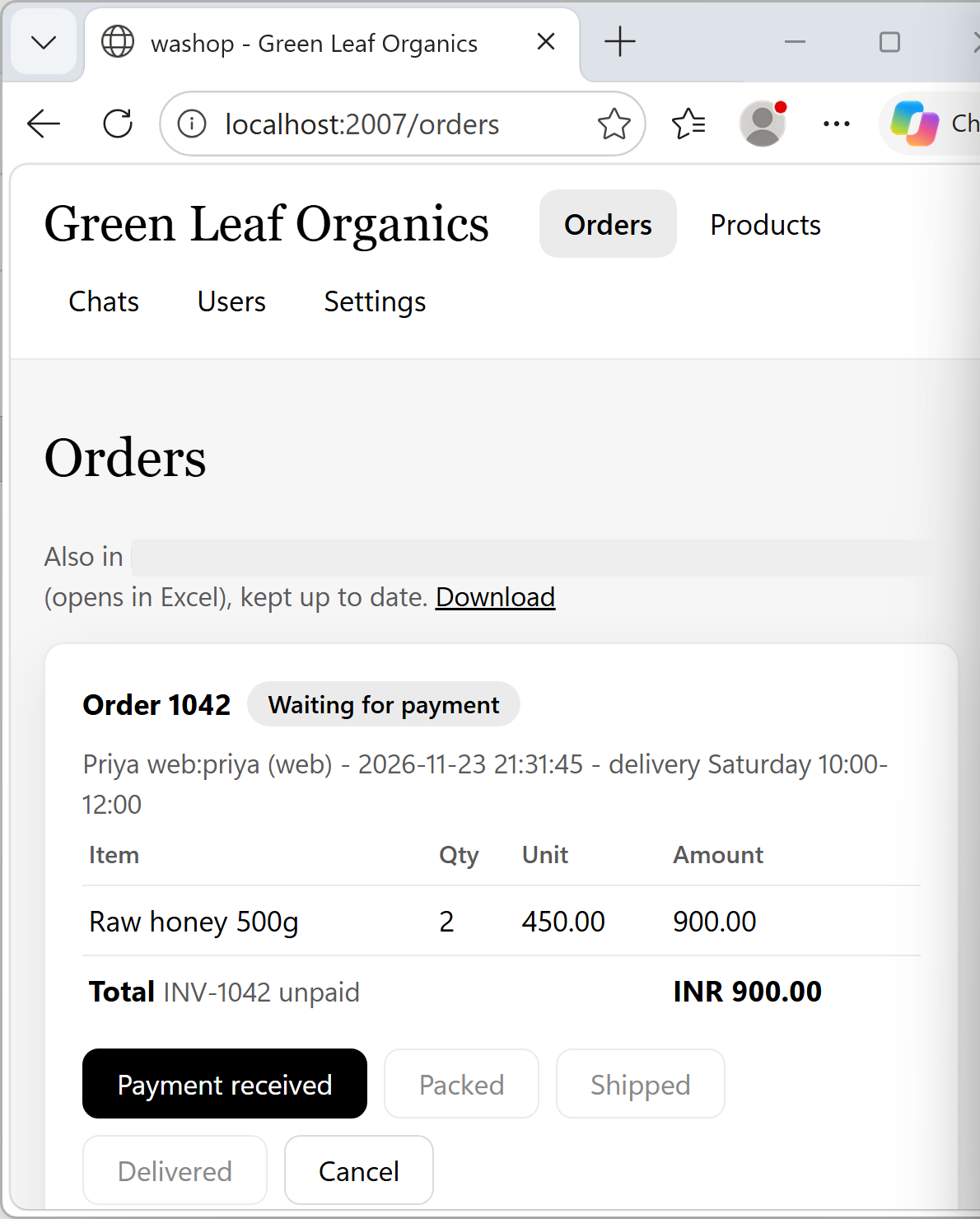
It answers questions, builds the order and sends the invoice. When the money arrives you click Payment received and the customer gets a receipt.
Everything a small chat shop needs
Every reply is filled in from your own data, so the bot cannot invent a price or a policy. The AI model only picks what to do.
Answers from your Excel file
Products, prices, stock and your FAQ live in one Excel file. Keep editing it in Excel; OwnShop AI reads it again when you save and writes the new stock back after each order.
Orders in chat
"add 2 raw honey" builds the order. It is confirmed only when the customer replies YES, and every order lands on the Orders page and in orders.csv.
Delivery slots or bookings
A product shop offers delivery slots with a capacity. A service shop (clinic, salon, tuition, repair) lets customers book a day and time, shown on a Calendar page.
Invoices with photos
Add a photo per product. Customers see it when they search, when they add the item and on the invoice.
Your way to get paid
A payment link (PayPal, Stripe, Wise or similar), a QR code image, bank transfer details, or UPI with a QR code per order. Set one or several.
One click: Payment received
OwnShop AI marks the invoice paid and sends the customer a receipt. Packed, Shipped, Delivered and Cancel each message the customer too.
Status replies
"what is the status?" finds that customer's own order and answers, for example "Order 1042: Payment received. Delivery slot: Saturday 10:00-12:00."
Block users
The Users page lists every customer from every channel. A blocked customer gets no reply anywhere; their past orders stay.
Web chat for testing
Add a test customer and chat with your shop in the browser, without a phone. Orders and chats show up like real ones.
You stay in charge
OwnShop AI handles the routine messages. Anything it is not sure about comes to you.
- Hand-off when unsure. A product, slot or answer that is not in your data becomes "the shop will reply shortly", and you answer from the Chats page.
- Only replies, never broadcasts. OwnShop AI answers people who wrote first. The only messages it sends by itself are updates on that customer's own order.
- Human pace. At most one message every 2 seconds per chat, a typing pause, and a daily send cap you set.
- Voice notes. Short voice notes are transcribed on your computer and answered like text.
- Your data stays local. Orders, products and chats live in files on your computer.
Honest limits
Read these before you rely on it.
Your computer has to stay on
OwnShop AI runs on your laptop or PC. When it is off or offline, nobody gets a reply. Messages that arrived while it was off are not answered in a burst.
You check payments yourself
OwnShop AI never touches money and is not connected to a payment provider. You look at your bank or wallet and click Payment received.
The model is small
In our test it picked the right action for 30 of 44 customer messages, about 7 in 10. When it is not sure, the customer is told the shop will reply and the message comes to you. Replies are in English for now.
The WhatsApp link is unofficial
WhatsApp is connected through an unofficial WhatsApp Web client, which may break WhatsApp's terms, and the number can be banned. Use a spare number. Telegram uses the official Bot API.
Download OwnShop AI
One file per computer. It carries OwnShop AI, the WhatsApp client, the model server and the AI model.
Windows may say "Windows protected your PC": click More info, then Run anyway. The Mac app is not notarized yet: the first time, right-click OwnShop AI and choose Open. Step-by-step setup is in the docs.
Questions
Is it really free?
Yes. There is no plan and no AI bill: the model runs on your computer. The only running cost is keeping your computer on and online.
Do I need a server, a website or an AI account?
No. OwnShop AI serves its own page on your computer, and the AI model is in the download. You need an internet connection for WhatsApp and Telegram.
Can I use my main WhatsApp number?
We advise against it. The WhatsApp link is unofficial and WhatsApp may block numbers that use unofficial clients. Use a spare number, or use Telegram, which is official and free.
Does OwnShop AI take payments?
No. It sends your payment details with the invoice: a payment link, a QR code image, bank transfer text or UPI. You check that the money arrived and click Payment received.
What if the bot gets a question wrong?
Replies are filled in from your own Excel file, so it does not make up prices. When the model is not sure, or what the customer asked is not in your data, the message is handed to you on the Chats page.
I sell services, not products. Does it work?
Yes. Choose Services in the first setup step and pick your kind of business. Customers write things like "book Haircut" and pick a day and time. A shop sells products or services, not both.
Which languages does it understand?
Ordering works best in English and replies are in English for now. Questions in other languages work better when you add your own words in that language to the keywords in your sheet.
Can I try it without a customer?
Yes. Add a test customer on the Users page and open the web chat on the same computer. You chat exactly like a customer would.
I want this on the official WhatsApp Business Platform.
OwnShop AI does not use the official platform. For an official, business or enterprise setup, talk to us at deemwar.com.